GEMEK 2K Dash Cam vs Nextbase
We compare the GEMEK 2K Dash Cam and the Nextbase across every dimension that matters - our scores, the key specs, and how each performs on the things you will actually notice day to day.
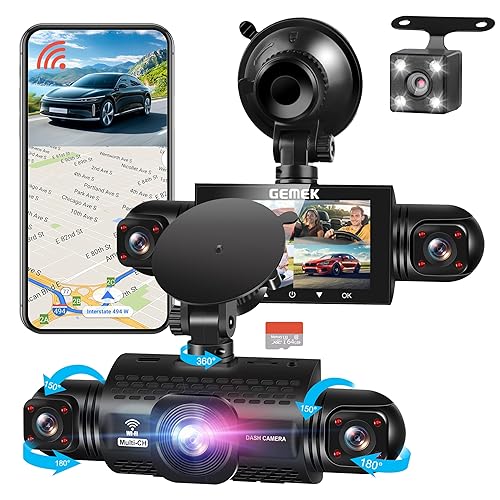

At a glance
| GEMEK 2K Dash Cam | Nextbase | |
|---|---|---|
| Our score | 8.0/10 | 9.1/10 |
| Best for | Drivers wanting evidence and peace of mind, with front and rear cover and parking protection | Drivers wanting evidence and peace of mind, with front and rear cover and parking protection |
| Not ideal for | Anyone wanting a fully fit-and-forget device, since a microSD card and a little wiring are needed to get the best from it | Anyone wanting a fully fit-and-forget device, since a microSD card and a little wiring are needed to get the best from it |
| Brand | GEMEK | Nextbase |
Video Quality and Resolution
GEMEK 2K Dash Cam
Video quality hinges largely on the front camera's stated 2K/1440p resolution, which is the clearest specification provided for everyday recording. At this 2K detail level, the dash cam should be able to capture the street layout, lane markings, and readable signs more clearly than basic HD, with less motion blur during daylight. In darker conditions, resolution alone cannot address low-light limitations, so night capture performance becomes the deciding factor.
Nextbase
With 1080p front video resolution, the 222XR is designed to deliver clear, full HD detail from the road ahead, which can be useful for reading road-facing details in normal daylight. The front camera output is specified as 1080p, so the focus is on full HD clarity rather than higher resolutions. In practical use, perceived sharpness will vary with lighting, motion, and how steady the view is, because changes can reduce how much fine detail is seen. The device also supports night vision.
Front and Rear Coverage
GEMEK 2K Dash Cam
Front and rear coverage on this dash cam is centred on the 2K/1440p front and rear inside setup. The intention is to record what happens ahead of the vehicle and behind it, while keeping the cabin in view, as the model is described as a 3-channel dash cam: front, rear, and cabin. With the front camera facing the road and the rear camera covering the area behind, drivers can review incidents from two angles. The cabin view adds context, which can be useful in situations involving passengers or rear seating. Coverage depends on camera placement.
Nextbase
The 222XR records from both the front and rear, helping to cover activity directly in front of the car as well as what follows behind. This dual setup supports routine driving by capturing rear-adjacent events such as lane changes. It also provides a rear view alongside the front view when reversing or pulling out, reducing reliance on a single viewpoint. Coverage depends on camera positioning and mounting; incorrect installation can leave gaps. When used with loop recording, new files replace older ones, so the most recent footage is the most relevant.
Night Vision
GEMEK 2K Dash Cam
Night vision matters most when street lighting is low, as the dash cam needs to capture faces, number plate areas and lane details as clearly as possible in darker scenes. The GEMEK includes "Night Vision", but the review does not confirm the exact method or its limits, as those details are Not disclosed. Results are typically better when subjects are closer, contrast is higher and reflections are controlled. The dash cam records 2K/1440p front video and covers the rear and cabin, but low light still reduces sharpness, especially on fast motion. Exposure settings are Not provided.
Nextbase
Night vision is one of the practical reasons this dash cam can be useful after dark, since it includes "night vision" for the cameras. With dual front and rear camera coverage, night detail can be checked from the driver's view and from the road behind. In low light, the night vision feature helps reduce reliance on outside lighting, but results still depend on street illumination and weather. Secure the camera using the magnetic mount and keep the lenses clean, as smudges can soften night contrast. When reviewing footage, check both the front and rear 1080p recordings for readable detail rather than brightness alone.
Parking Mode
GEMEK 2K Dash Cam
Parking mode is designed to help a dash cam record activity while the car is off, so impacts or attempted break-ins after parking can be captured. The dash cam's parking mode can extend event coverage beyond normal driving, which is useful in busy streets or when vehicles are left unattended. The dash cam's results depend on setup, including correct placement of the front, rear and cabin units, and ensuring the required power connection is in place. Performance can vary with conditions, as low light and movement are harder to detect, and false alerts may occur if sensitive triggers are misadjusted.
Nextbase
Parking Mode on the Nextbase is designed to help the dash cam record while the vehicle is parked, including events outside normal driving hours after trips end. The unit is set up to begin capturing when the vehicle is stationary, then uses motion detection to trigger footage and reduce unnecessary clips. For parking use, the driver should ensure the dash cam is powered appropriately, as not all setups support extended recording. Parking Mode is useful, but it can fail to capture incidents if no movement is detected.
GPS and Speed Data
GEMEK 2K Dash Cam
For a dash cam to be more than just a video recorder, GPS and speed data can link footage to where it was recorded and how fast the vehicle was travelling. For the GEMEK, whether GPS and built-in speed recording are included is not stated in the available product title details. If GPS and speed tracking are available, it typically works by stamping the footage with location and movement information during recording, then matching it to the video timeline. Without that data, review stays limited to what the camera captures, and any analysis remains visual only.
Nextbase
GPS and speed data on the dash cam help add location and driving speed context to recorded clips. After a drive, recorded files can be reviewed to see where the vehicle was and how fast it was moving, which can support incident timelines. This can also help with quick comparisons between parts of a journey by time and route. Performance depends on whether GPS data is captured during recording, and gaps may occur if reception is weak.
Screen, App and Wi-Fi
GEMEK 2K Dash Cam
What can drivers expect from the dash cam's screen and connectivity? The dash cam includes an on-device screen for reviewing footage. For day-to-day control, drivers can use a Wi-Fi connection and an accompanying app to view clips on a phone. The product title indicates app control, suggesting key functions can be triggered remotely. Wi-Fi availability depends on phone settings and signal strength, so performance may vary in busy areas. Connectivity is a clear selling point, but details on how well it performs are limited.
Nextbase
The Nextbase includes a 2.5-inch IPS screen, allowing drivers to review recordings directly on the dash cam without needing a computer. This in-car playback can make it easier to check events soon after a trip, particularly when the vehicle is parked. Beyond on-screen viewing, the app and Wi-Fi features can be used to transfer footage. Typically, the workflow involves the dash cam connecting wirelessly, then viewing or sharing video in the phone app. If connectivity is weak, this step may slow review.
Installation and Ease of Use
GEMEK 2K Dash Cam
Installation is fairly straightforward for most drivers, especially because the GEMEK 2K is designed for a multi-camera setup covering the front, rear, and cabin. It involves routing the cables for each unit, mounting the cameras so they stay in view, and connecting power so recording begins when the car is on. Rear and cabin placements can be fiddly on some windscreens, particularly where trim is tight. After installation, day-to-day use focuses on the Wi-Fi app connection, which allows owners to adjust basic viewing options and access captured footage without removing the device.
Nextbase
Installation is usually straightforward because the dash cam uses a magnetic mount, so the dash cam can be attached and removed without tools. A driver can place the 2.5-inch IPS screen so it remains readable while staying within the view of the road. After mounting, the camera needs basic positioning to cover expected lanes, and the G-sensor, motion detection and loop recording are then reviewed in the menus. Ease improves once settings are confirmed, although first-time setup can take longer.
Who Is This Dash Cam For?
GEMEK 2K Dash Cam
This dash cam suits drivers who want broad coverage without complicated add-ons, because the GEMEK is a 3-channel system with front, rear and cabin cameras, providing a 360° field of view. It fits people who park in different situations, as 24-hour parking mode is included, and it suits those who prefer phone control thanks to a Wi-Fi app connection. It may be less ideal for buyers wanting a simple front-only setup, because the extra cameras need planning for positioning. Drivers who care about night recording should note that night vision is specified.
Nextbase
Who this dash cam suits depends on how a driver plans to use a front-and-rear recording setup. The Nextbase 222XR is designed for dual front and rear use, providing 1080p Full HD recording from the front and from a second rear camera. It suits motorists who regularly stop and park, because the intelligent parking mode supports motion and events while the vehicle is stationary. Drivers who value a clear view of what is recorded are likely to appreciate the 2.5-inch IPS screen. Drivers wanting only a single-camera approach, or those who do not need parking monitoring, may find it more than they require.
GEMEK 2K Dash Cam: pros
- 2K/1440p front recording
- 3-channel (front, rear and cabin)
- Parking mode watches the car while you are away
- Night vision for low-light driving
- Wi-Fi app for quick footage download
Cons
- A microSD card is often not included, so budget for a high-endurance one
- Parking mode usually needs a separate hardwire kit to power it with the engine off
- Fitting and tidy cable routing take a few minutes, and footage needs occasional clearing
Nextbase: pros
- 1080p front recording
- Dual front and rear
- Parking mode watches the car while you are away
- Night vision for low-light driving
Cons
- A microSD card is often not included, so budget for a high-endurance one
- Parking mode usually needs a separate hardwire kit to power it with the engine off
- Fitting and tidy cable routing take a few minutes, and footage needs occasional clearing
Our verdict
Our pick is the Nextbase (our score 9.1/10) - A practical dash cam (1080p front, dual front and rear) that captures clear evidence on the road for insurance and disputes. The GEMEK 2K Dash Cam is still worth it if it is cheaper when you check, or if it better matches your specific needs.