Miofive 4K Dash Cam vs 70mai Dash Cam M310 Plus 4K
We compare the Miofive 4K Dash Cam and the 70mai Dash Cam M310 Plus 4K across every dimension that matters - our scores, the key specs, and how each performs on the things you will actually notice day to day.

At a glance
| Miofive 4K Dash Cam | 70mai Dash Cam M310 Plus 4K | |
|---|---|---|
| Our score | 7.7/10 | 8.6/10 |
| Best for | Drivers wanting evidence and peace of mind and parking protection | Drivers wanting evidence and peace of mind and parking protection |
| Not ideal for | Anyone wanting a fully fit-and-forget device, since a microSD card and a little wiring are needed to get the best from it | Anyone wanting a fully fit-and-forget device, since a microSD card and a little wiring are needed to get the best from it |
| Brand | Miofive | 70mai |
Video Quality and Resolution
Miofive 4K Dash Cam
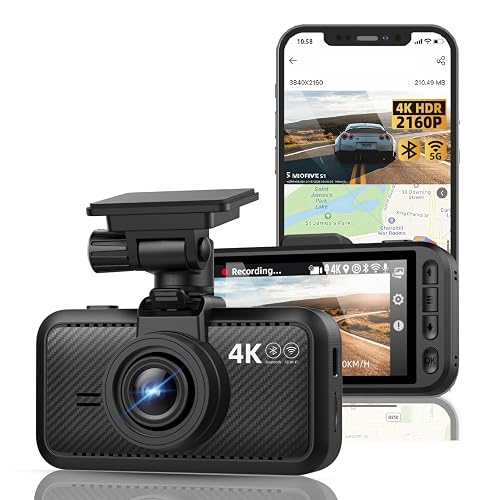
The dash cam is positioned as a front-facing 4K 2160P dash camera, focusing on recording the road ahead in a higher resolution format than standard 1080p footage. In practical terms, this is intended to make lane markings and vehicle details clearer during playback, particularly when footage is viewed on larger screens. The camera uses a 140° wide angle, which allows more of the scene to fit into the frame, though fine detail near the edges can appear less sharp. Night vision is listed, but the actual night-time image quality depends on the available lighting and driving conditions.
70mai Dash Cam M310 Plus 4K
Video quality on this dash cam centres on its 2160P front video capture, which is listed alongside night vision support for low-light driving. With a 4K-rated front stream, detail should be strong for everyday incidents, and recorded text on street signs may be clearer than lower-resolution dash cams. In darker conditions, the night vision claim suggests footage remains usable, but results can vary with weather, glare, and how much light is available. The camera's wide-angle view (not stated) also affects how sharp edges look in practice, even when the centre remains crisp.
Front and Rear Coverage
Miofive 4K Dash Cam
Front and rear coverage is not the main focus of this model, as it is a front-only dash cam that records activity through the windshield ahead of the vehicle. The review notes that incidents behind the car are not captured by this unit, so drivers wanting rear evidence need a separate solution. The camera uses a 140° wide-angle view to cover more of the road ahead and improve lane-level context. In everyday use, this means fewer blind areas than a narrower lens, but it still does not provide rear number plate detail or record traffic interactions behind the vehicle.
70mai Dash Cam M310 Plus 4K
With front recording in focus, the 70mai is described as a "Mini Wi-Fi Car Camera" and a "Dash cam, 2160P" dash cam, so its main coverage is the 4K (2160P) front view. In typical use, the camera is positioned to capture the road ahead, with the wide-angle view meant to include nearby lanes and edges. Rear coverage is addressed by the overall dash-cam design. For practical verification, users should check the app feed, confirm file content, and adjust mounting before relying on rear footage.
Night Vision
Miofive 4K Dash Cam
Night vision is one of the Miofive dash cam features, designed to capture more usable detail as light levels drop at dusk or during night driving. It targets darker road scenes where headlights and street lights can create glare and shadows. The camera aims to make key elements such as lane markings and nearby vehicles easier to recognise than they would be without night assistance. Performance still depends on ambient lighting, weather conditions and how reflective surfaces appear. Coverage is front-only, so visibility is limited to the forward view.
70mai Dash Cam M310 Plus 4K
Night vision on the 70mai is designed to help capture clearer footage in lower-light conditions, as indicated by the product title. Dark performance depends on factors such as local street lighting, the camera position behind the windscreen, and whether headlamp glare falls directly into the lens, so results can vary between drives. For the best outcome, the lens should be kept clean, heavy reflections on the glass should be avoided, and the camera view should be kept level. On very unlit roads, finer details may be harder to distinguish, but key shapes and lane context should still be recorded more reliably than without night features.
Parking Mode
Miofive 4K Dash Cam
Parking Mode on the dash cam is designed to keep recording when the car is parked, helping capture incidents outside normal driving hours. It is set up for 24H parking mode use, allowing the camera to continue monitoring after the driver stops. The setting is activated before leaving, and the dash cam is mounted securely on the front windscreen area. This can provide additional evidence if an incident occurs while parked, but parking mode can increase wear and drain if the power setup is not handled properly. Overall, it suits drivers who want extended coverage beyond typical driving hours.
70mai Dash Cam M310 Plus 4K
Parking Mode on the dash cam is designed to keep the camera recording when the car is parked, so incidents around the vehicle can still be captured instead of relying only on driving footage. In day-to-day use, this can be useful for short stops where damage or vandalism may occur, as long as the vehicle remains stationary. The dash cam continues monitoring rather than switching off immediately after parking. How long recording lasts depends on whether the setup is ready to power the camera while parked. For best results, confirm the camera is placed properly before relying on parking mode.
GPS and Speed Data
Miofive 4K Dash Cam
Built-in GPS helps this dash cam add location information to recordings, which can be useful when reviewing where an event occurred. Because the unit includes GPS, it can typically attach time-stamped footage to a place, allowing incidents to be matched to routes and intersections. Speed data may also be derived from the GPS signal. If GPS signal reception is weak, the dash cam may record less reliable position or speed details, even when the video remains usable. Overall, GPS adds context, but performance depends on signal coverage.
70mai Dash Cam M310 Plus 4K
GPS and speed data can help drivers understand when events happened and how fast the vehicle was moving, but this only works if the dash cam has the needed GPS capability and if the data displays correctly in the app or is captured in the recorded footage. If GPS is available, the dash cam can time-stamp incidents using its internal clock, then display vehicle speed trends during recording. If GPS is missing or unstable, speed and location details may be absent or incomplete, so timestamps alone become less informative.
Screen, App and Wi-Fi
Miofive 4K Dash Cam
The Miofive 4K makes viewing and setup straightforward thanks to its 3.0-inch IPS screen. The screen can show what the front camera sees, which helps confirm basic settings without needing a phone. For day-to-day footage checks, the Miofive relies on a mobile connection via 5G WiFi and Bluetooth. This app-based workflow is convenient for viewing and managing clips from a phone or tablet. Built-in GPS can also add location context to footage, but no additional details are given.
70mai Dash Cam M310 Plus 4K
The 70mai Dash Cam M310 uses a phone-based setup for viewing and managing recordings, as its title states Wi-Fi app connection and voice control. Playback does not rely on a large built-in screen. Through the app over Wi-Fi, users can access dash footage and manage clips, which is useful for checking incidents quickly. Voice control offers an alternative way to trigger actions, although accuracy can depend on ambient noise. Overall, the system is designed around smartphone handling, and performance depends on a reliable Wi-Fi link quality.
Installation and Ease of Use
Miofive 4K Dash Cam
The 3.0-inch IPS screen and the phone workflow described earlier make it easier to judge what the dash cam is recording, and that same see-it-right-away approach carries into setup. Installation typically starts with mounting the front-only unit at eye level, then routing the power cable neatly toward the car's supply. The next step is pairing and connecting through the app, where 5G WiFi and Bluetooth help speed up setup. Built-in GPS can add location data automatically, although accuracy depends on satellite lock time. After installation, 24H parking mode should be confirmed so drivers know it activates when the engine stops.
70mai Dash Cam M310 Plus 4K
Installation is usually straightforward because the 70mai is set up through a phone app using Wi-Fi app connection, and the dash cam supports voice control for certain actions. The driver mounts the camera, then pairs it in the app over Wi-Fi, following the on-screen prompts. Next, recording settings such as loop recording and time-lapse are adjusted in the app and then saved. Ease of use is supported by voice control for limited functions, which helps keep hands on the wheel. Setup depends on a stable phone connection, and if Wi-Fi pairing fails, the process can take longer.
Who Is This Dash Cam For?
Miofive 4K Dash Cam
Who this dash cam fits best depends on what the driver wants from a front-only setup, especially if clear daytime footage and practical in-car features are the priority over a wide multi-camera view. It suits drivers who mainly want a front view at 4K/2160P resolution with a 140° wide angle. It also fits those who value built-in GPS, with location data delivered in a companion app via Wi-Fi and Bluetooth. The built-in 3.0" IPS screen helps users review clips without relying only on a phone. With 24H parking mode, it can be useful for incidents while the car is parked, although night performance is still variable.
70mai Dash Cam M310 Plus 4K
This dash cam is designed for drivers who want a straightforward in-car setup guided through a phone app, using a Wi-Fi app connection. It also offers voice control for limited actions, making it suitable for regular drivers who prefer quick, practical operation rather than deep menu navigation. The 2160P 4K front recording focuses on clear forward detail, with night vision support intended to improve performance after dark. It is also a good option for drivers looking for parking monitor coverage, as parking mode is included. It is less suited to anyone who wants extensive manual tuning.
Miofive 4K Dash Cam: pros
- 4K front recording
- Built-in GPS stamps speed and location
- Parking mode watches the car while you are away
- Night vision for low-light driving
- Wi-Fi app for quick footage download
Cons
- A microSD card is often not included, so budget for a high-endurance one
- Parking mode usually needs a separate hardwire kit to power it with the engine off
- Fitting and tidy cable routing take a few minutes, and footage needs occasional clearing
70mai Dash Cam M310 Plus 4K: pros
- 4K front recording
- Parking mode watches the car while you are away
- Night vision for low-light driving
- Wi-Fi app for quick footage download
Cons
- A microSD card is often not included, so budget for a high-endurance one
- Parking mode usually needs a separate hardwire kit to power it with the engine off
- Fitting and tidy cable routing take a few minutes, and footage needs occasional clearing
Our verdict
Our pick is the 70mai Dash Cam M310 Plus 4K (our score 8.6/10) - A practical dash cam (4K front) that captures clear evidence on the road for insurance and disputes. The Miofive 4K Dash Cam is still worth it if it is cheaper when you check, or if it better matches your specific needs.