Nextbase Dash Cam vs Nextbase
We compare the Nextbase Dash Cam and the Nextbase across every dimension that matters - our scores, the key specs, and how each performs on the things you will actually notice day to day.

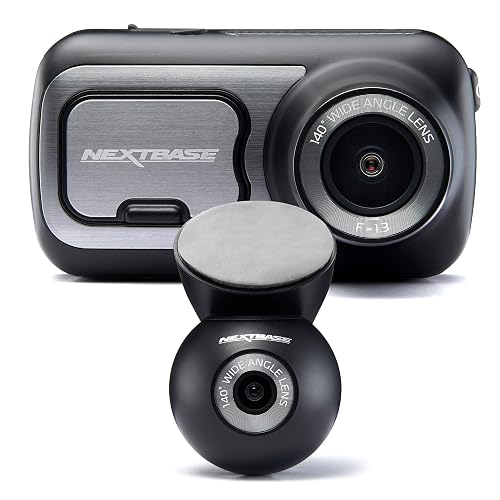
At a glance
| Nextbase Dash Cam | Nextbase | |
|---|---|---|
| Our score | 7.4/10 | 7.3/10 |
| Best for | Drivers wanting evidence and peace of mind, with front and rear cover and parking protection | Drivers wanting evidence and peace of mind, with front and rear cover and parking protection |
| Not ideal for | Anyone wanting a fully fit-and-forget device, since a microSD card and a little wiring are needed to get the best from it | Anyone wanting a fully fit-and-forget device, since a microSD card and a little wiring are needed to get the best from it |
| Brand | Nextbase | Nextbase |
Video Quality and Resolution
Nextbase Dash Cam
With a stated front-and-rear setup, this dash cam is designed to record in 1080p Full HD resolution from both cameras. This gives clear detail for reading lane markings and recognising nearby vehicles in typical day-to-day use, with edges preserved when the scene is not overly distant. Image clarity is still influenced by conditions including glare from bright lights, wet roads, and motion blur during fast manoeuvres. The review notes that night performance support is listed.
Nextbase
Video Quality and Resolution is a key factor for the Nextbase, as it records in both front and rear directions. The product title specifies 2K/1440p for the front camera, indicating higher detail on the road ahead than lower-resolution dash cams. For day-to-day clarity, sharpness in daylight should be checked separately from night performance, because night results depend on exposure and available lighting. Night vision is supported.
Front and Rear Coverage
Nextbase Dash Cam
Front and rear coverage matters for the Nextbase because it uses a dual camera setup to record both the road ahead and the area behind the vehicle. This helps with reviewing lane changes, junction exits, and incidents involving vehicles that follow closely. The front camera records in 1080p Full HD, while the rear recording is handled by a second camera. In day-to-day use, the dual view can make evidence gathering simpler, because events are less likely to be missed when they occur from behind. Coverage depends on camera aim, so careful mounting is important.
Nextbase
With dual front and rear cameras, the dash cam is designed to record both the road ahead and traffic behind while driving. The front camera captures the forward view, and the rear camera records traffic and hazards approaching from behind, which can be helpful after incidents or disputes. Footage can be reviewed on the 2.5-inch IPS touch screen. Coverage quality depends on the camera mounting positions and alignment before each journey. If the rear view is blocked by passengers or items, rear coverage will be reduced.
Night Vision
Nextbase Dash Cam
Night vision is a key reason some drivers consider the dash cam, because it is listed as having night vision for darker road conditions. The feature is intended to keep the front and rear footage readable when street lighting drops, including when vehicles are moving at normal urban speeds. Limits still apply: fog, heavy rain and very dark lanes can reduce detail even with night improvement. For a specific route, comparing clips from similar times of night is the most reliable way to spot glare, blur and shadowed areas.
Nextbase
Night vision on the Nextbase is designed to improve visibility in darker driving conditions, including at night and in low-light areas. In use, it aims to deliver clearer front and rear footage as light levels drop, making lane markings and surrounding traffic easier to spot earlier. The benefit is linked to the dual front and rear camera setup, with each direction recorded as conditions change. Performance will still depend on street lighting, weather, and headlight glare, which can reduce contrast. The strongest results are expected on darker roads, while extremely bright scenes may cause details to wash out.
Parking Mode
Nextbase Dash Cam
Parking mode is designed to help the Nextbase continue recording when the car is stationary. It is useful in locations such as home driveways or supermarket car parks, where incidents can occur while vehicles are parked. When the vehicle is left, the cam can keep capturing, so short events such as bumps or door strikes may still be recorded. Parking use is most practical when the car is expected to remain in place for a while and wider coverage beyond standard driving-only recording is needed. Parking operation may require additional planning, since recording while parked may not suit every battery situation.
Nextbase
Parking Mode on the dash cam is intended to record events while the car is not being actively driven. When enabled, it can capture footage during stationary time, so short disturbances may still be logged. Parking Mode behaviour is not described in the product title, so activation triggers and recording duration are unclear. Check the in-app settings before relying on Parking Mode for incident capture.
GPS and Speed Data
Nextbase Dash Cam
The dash cam includes built-in GPS, which enables location and speed-related information to be added to the dashcam footage. When the camera records, the GPS data can be matched to a journey, helping viewers see where incidents occurred and how fast the vehicle was travelling. This is useful for reviewing routes, reporting events, and checking driving patterns. GPS and speed accuracy depends on clear signal reception, and in tunnels or built-up areas the data may be less consistent (not stated how often). Overall, the GPS and speed overlays provide practical context without requiring extra setup.
Nextbase
GPS and speed data are key features because they add location and timing context to dashcam footage, which supports incident review and clip sharing. On the Nextbase 422GW, built-in GPS can be used to check events against where they happened. Speed readings add further context by showing whether the vehicle was moving quickly or slowly at the time of impact. The dashcam records front and rear views even when GPS signal quality is poor, although location accuracy may be reduced. For best results on longer journeys, drivers should allow time for a clear GPS fix.
Screen, App and Wi-Fi
Nextbase Dash Cam
A dashcam touch-screen is only useful if it makes setup and day-to-day viewing simpler, and the Nextbase 322GW uses a 2.5-inch IPS touch screen to display and control what the camera is capturing. For sharing or reviewing footage, it supports Wi-Fi, and it pairs with a companion app on a phone. The app connection can help viewing clips after a short drive without relying solely on the camera screen.
Nextbase
How the dash cam is viewed and controlled matters, especially when footage needs quick checking after an incident. The Nextbase uses a 2.5-inch IPS touch screen, so menus and playback can be accessed directly in the car. It also supports Wi-Fi app connection, allowing users to view or manage recordings through a paired mobile app. Voice control can reduce screen tapping when hands are busy. For fast review, it helps to know where key options sit, as deeper settings may take more steps.
Installation and Ease of Use
Nextbase Dash Cam
Installation is usually straightforward with the Nextbase because it includes a built-in GPS and a 2.5-inch IPS touch screen for on-device setup checks, while the companion app connection supports reviewing clips after a drive. Mounting and routing the front and rear camera cables takes some care to keep the wiring tidy. Once powered, the touch screen guides basic configuration, and the built-in GPS helps confirm location data is being captured. Wi-Fi connection simplifies transferring and viewing footage, though it can take a few tries depending on phone signal and app responsiveness. Emergency SOS access is available.
Nextbase
Installing the dash cam is straightforward, but reliable recording depends on correct placement. The front and rear units must be mounted, and the cables routed neatly so they do not interfere with mirrors or controls. Built-in GPS performs best when the unit has a clear view of the road, and the 2.5-inch IPS touch screen helps confirm the initial setup. Voice control and app connection support the early settings, and parking mode can be enabled through the menu. A first test drive is important, because installation angle and positioning affect image coverage and the ability to identify key details.
Who Is This Dash Cam For?
Nextbase Dash Cam
Who is the dash cam for, and what kinds of drivers will benefit most? It is aimed at drivers who want a front and rear view, thanks to dual front and rear cameras and 1080p Full HD front recording. It also suits commuters who park regularly. Road users who want map-based footage can make use of built-in GPS, while those who prefer phone control can use the Wi-Fi app connection and Bluetooth. It fits everyday drivers overall.
Nextbase
This dash cam suits drivers who want front and rear coverage without setting up separate devices, and it is particularly useful for people who travel in mixed city and rural routes where incidents can occur from multiple directions. It also fits commuters who want reliable evidence for the road ahead and what happens behind, since it includes dual front and rear cameras. Built-in GPS and an app connection via Wi-Fi may make it easier to plan trips and review footage. The model also supports voice control and an IPS touchscreen.
Nextbase Dash Cam: pros
- 1080p front recording
- Dual front and rear
- Built-in GPS stamps speed and location
- Parking mode watches the car while you are away
- Night vision for low-light driving
Cons
- A microSD card is often not included, so budget for a high-endurance one
- Parking mode usually needs a separate hardwire kit to power it with the engine off
- Fitting and tidy cable routing take a few minutes, and footage needs occasional clearing
Nextbase: pros
- 2K/1440p front recording
- Dual front and rear
- Built-in GPS stamps speed and location
- Parking mode watches the car while you are away
- Night vision for low-light driving
Cons
- A microSD card is often not included, so budget for a high-endurance one
- Parking mode usually needs a separate hardwire kit to power it with the engine off
- Fitting and tidy cable routing take a few minutes, and footage needs occasional clearing
Our verdict
Our pick is the Nextbase Dash Cam (our score 7.4/10) - A practical dash cam (1080p front, dual front and rear, GPS) that captures clear evidence on the road for insurance and disputes. The Nextbase is still worth it if it is cheaper when you check, or if it better matches your specific needs.